



LAB Color Space: The Printing Industry’s Guide to Accurate Color Management
In the world of printing and color management, precision isn’t just a goal—it’s a requirement. When you’re producing packaging, the ability to reproduce colors accurately and consistently is vital for brand integrity and client satisfaction. One of the most powerful tools for achieving this is the LAB color space, sometimes referred to as the CIE LAB color space or color space LAB.
In this article, we’ll break down what LAB color space is, why it’s important for the printing industry, how it compares to other color models like RGB and CMYK, and how it fits into professional workflows for color measurement, proofing, and quality control.
What is LAB Color Space?
The LAB color space is a color model developed by the International Commission on Illumination (CIE) in 1976, officially called the CIE LAB color space. Unlike RGB or CMYK, which are device-dependent, LAB is a device-independent color space. This means that LAB defines colors based on human visual perception rather than the capabilities of a specific monitor, printer, or camera.
Its purpose is to represent all colors visible to the human eye in a way that can be used as a standard reference for color conversions and measurements.
The LAB color space is designed to be perceptually uniform—meaning that the numerical distance between two colors in LAB space corresponds to the perceived difference between those colors. This makes LAB invaluable for evaluating color accuracy, performing quality checks, and managing color conversions across devices.
What Does L*a*b* Stand For?
The LAB model has three channels:
- L* – Lightness, from 0 (black) to 100 (white).
- a* – The position between green (negative values) and red (positive values).
- b* – The position between blue (negative values) and yellow (positive values).
This separation of lightness from color information makes LAB especially useful for tasks like color correction and retouching, since lightness can be adjusted without altering hue or saturation.
What is L in LAB Color Space?
In the LAB color space, L stands for Lightness. It describes how light or dark a color appears, independent of its hue or chroma. In printing, controlling lightness is critical for ensuring tonal balance and maintaining detail in highlights and shadows.
Why Use LAB Color Space?
For the printing industry, LAB color space offers several advantages:
- Device Independence – LAB defines colors as humans see them, not as devices reproduce them. This makes it a universal reference for converting between color spaces like RGB and CMYK.
- Wider Gamut – LAB can represent colors outside the gamut of printers, monitors, and inks, making it an ideal reference model for maintaining accuracy during conversions.
- Quality Control – Because LAB values can be measured precisely, they’re used in Delta E calculations to quantify color differences during print runs.
- Consistency Across Media – LAB enables matching colors across different substrates, coatings, and printing processes.
In short, LAB is the language of color accuracy—vital for achieving brand consistency in a print production environment.
What Percentage of Colors Detectable to the Human Eye Does LAB Color Space Represent?
The CIE LAB color space was designed to encompass all colors visible to the human eye—100% of the perceivable spectrum.
However, not every device can reproduce all those colors. Printers, monitors, and cameras each have their own limitations (gamuts) that cover only part of the LAB range. This is why LAB serves as a master reference in color conversions: it holds the target color values, and the device gamut determines how closely they can be reproduced.
The Difference Between RGB and LAB Color Space
While both RGB and LAB are color models, their purposes and characteristics differ significantly:
| Feature | RGB Color Space | LAB Color Space |
| Basis | Device-dependent (monitors, digital files) | Device-independent (human vision) |
| Primary Use | Displaying colors on screens | Color measurement, conversion, correction |
| Channels | Red, Green, Blue | Lightness, a* (green-red), b* (blue-yellow) |
| Gamut | Limited by display device capabilities | Covers all visible colors |
| Best For | Screen graphics, web design | Color accuracy, print proofing, QC |
In practical printing workflows, RGB files (from cameras or design software) are often converted into LAB for precise color adjustments before being mapped into CMYK for printing.
Is LAB the Same as CMYK?
No—LAB and CMYK are very different.
- CMYK (Cyan, Magenta, Yellow, Black) is a subtractive, device-dependent color model used in printing. Its gamut is limited compared to LAB.
- LAB is a perceptual color model that can describe colors well beyond the CMYK gamut.
In printing, LAB is often used as a bridge during color conversions. For example, converting from RGB to CMYK via LAB can produce more accurate results than direct conversion because LAB serves as a neutral, perceptual reference point.
What is L*C*h Color Space?
L*C*h is another way of describing colors in the CIE system. It uses the same L* value for lightness but replaces a* and b* with:
- C* – Chroma (color intensity or saturation)
- h – Hue angle (the actual color type, expressed in degrees)
The L*C*h model can be easier to understand for certain applications because it separates hue from saturation in a way that aligns with intuitive color perception. In printing, L*C*h is often used for quality control reporting because it can describe shifts in hue and saturation more clearly than a* and b* values alone.
How LAB Color Space Fits into Printing Industry Workflows
For printers and color management specialists, the LAB color space is more than a theoretical model—it’s a daily working tool. Here’s where it plays a role:
- Proofing and Prepress
When creating proofs, LAB values ensure that the target colors match brand guidelines before committing to a print run. Digital proofing systems often store colors in LAB, then simulate CMYK output on screen.
- Spot Color Matching
Pantone and other spot color systems are defined in LAB. This allows RIP software to convert spot colors accurately into the printer’s CMYK profile, minimizing color shifts.
- Pressroom Quality Control
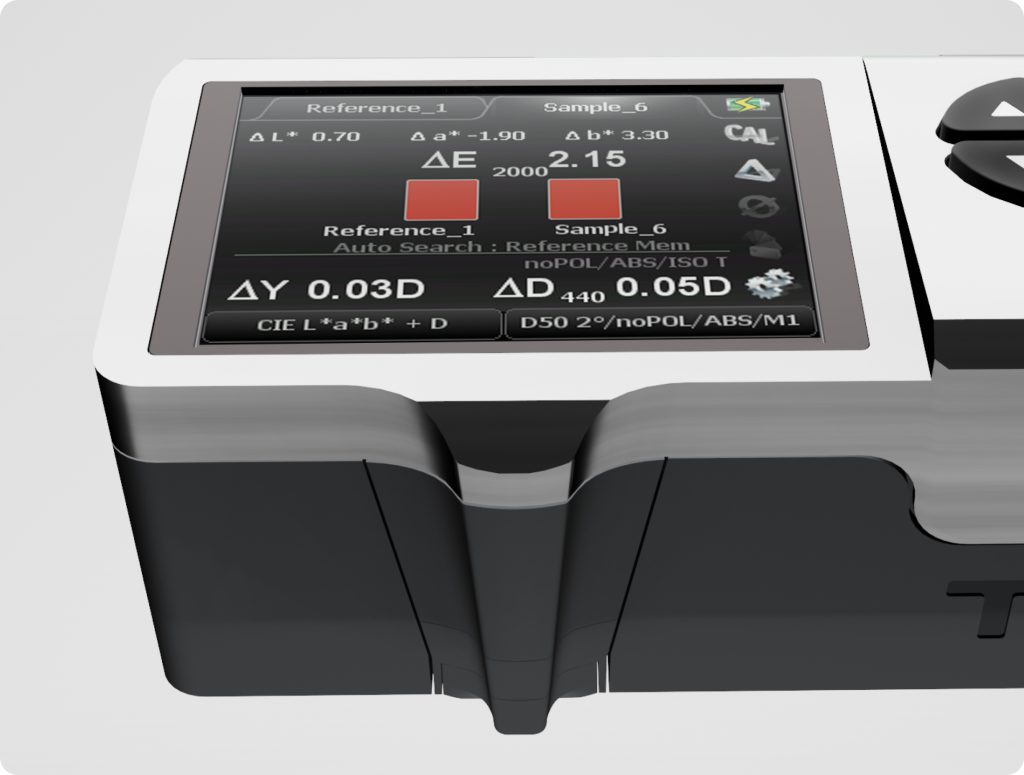
On press, spectrophotometers measure LAB values from printed sheets. These readings are compared to target LAB values, and Delta E calculations determine whether adjustments are needed.
- Cross-Process Color Matching
LAB enables matching between different printing processes—such as flexo, offset, and digital—by providing a neutral reference point.
Practical Example: LAB in Action
Let’s say a brand’s corporate blue has a LAB value of L*=35, a*=-2, b*=-50.
- On a coated substrate, the CMYK recipe might reproduce it perfectly.
- On an uncoated substrate, that same recipe may appear duller due to ink absorption.
- By measuring and adjusting LAB values, the prepress team can create a new CMYK mix that matches the original LAB color visually, even across different substrates.
Common Misunderstandings About LAB in Printing
- “LAB is just for designers.”
In reality, LAB is essential for press operators, quality control teams, and anyone involved in color-critical printing. - “LAB and L*C*h are completely different.”
They’re actually two ways of expressing the same color data—L*C*h just uses a polar coordinate system instead of Cartesian. - “You can print the entire LAB gamut.”
No printing process can match LAB’s full range, but LAB helps you reproduce the closest possible match.
Conclusion: LAB as the Language of Color Accuracy
In the printing industry, where brand color consistency can make or break a project, LAB color space is an indispensable tool. Its device-independent nature, perceptual accuracy, and universality make it the ultimate reference point for everything from proofing to press checks.
Whether you call it LAB color space or CIE LAB color space, understanding it—and using it effectively—can dramatically improve your print quality, reduce waste, and keep your clients happy.
Key Takeaways:
- LAB color space is based on human vision and includes 100% of colors detectable to the eye.
- The L in LAB stands for lightness, a* represents the green-red axis, and b* the blue-yellow axis.
- LAB is device-independent, making it a reliable reference for converting between RGB, CMYK, and other spaces.
- In printing, LAB ensures consistency, improves spot color matching, and provides accurate quality control metrics.