



How to Use a Spectrophotometer for Color Matching in Print
Color matching is crucial in the printing industry, however, achieving precise color consistency can be challenging. This is where spectrophotometers come into play.
Using a spectrophotometer helps maintain brand consistency. These color measurement devices ensure colors are reproduced accurately across different print batches. If a job does not match what a brand desired, printers may have to re-print the entire job, which costs a lot of money and requires a lot of wasted materials
In this guide, we will explore how to use a spectrophotometer for color matching in print. We will cover its importance, functionality, and best practices.
What Is a Spectrophotometer and Why Is It Important in Print?
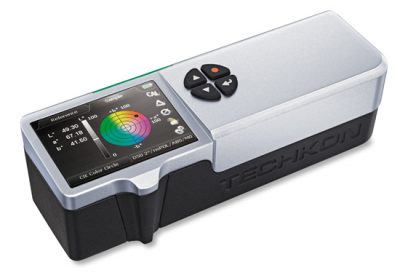
A spectrophotometer is an instrument that is used by printers for color matching. Spectrophotometers have the ability to measure Delta E, or the difference between 2 colors. In printing, exact color definition is crucial for maintaining quality. This precision ensures that printed materials meet desired color standards.
The importance of spectrophotometers in print cannot be overstated. They help ensure that colors match specified standards, which is essential for brand consistency. This consistency is especially important when printing jobs at different times or across different locations.
Spectrophotometers offer several key advantages in printing:
- Detect subtle color variations invisible to the human eye
- Maintain accuracy and quality across different printing runs
- Minimize waste by reducing color errors

Additionally, spectrophotometers find applications in many industries. These include textiles, plastics, and paint manufacturing, wherever color accuracy matters. For printing professionals, employing a spectrophotometer ensures every job is printed as intended.
Thus, incorporating this tool into the printing process streamlines operations. With improved color matching, businesses enhance output quality while reducing costs. The result is a more efficient, reliable printing workflow that meets the highest standards.
How Spectrophotometers Work: The Science Behind Color Matching
The spectrophotometer works by utilizing a white light source (LED or incandescent) that illuminates the desired measurement location. This reflects light which is then separated by either a diffraction grating or narrow band filters. In short, the spectrophotometer measures light intensity at different wavelengths to determine exact colors.
The core of this technology lies in its ability to detect subtle color differences. These variations might not be noticeable to the naked eye but can affect the quality of printed materials. By precisely analyzing the reflected light, spectrophotometers ensure color consistency and accuracy.
Key functions of spectrophotometers include:
- Measuring light absorption
- Analyzing reflection properties
- Comparing sample colors to standards or other samples
- Measuring ink density
Step-by-Step Guide: Using a Spectrophotometer for Color Matching
Before starting, ensure the spectrophotometer is properly calibrated. Calibration aligns the device’s readings to standardized values. This step is crucial for accurate measurements. The calibration processes for inline, handheld, and scanning spectrophotometers are detailed below:
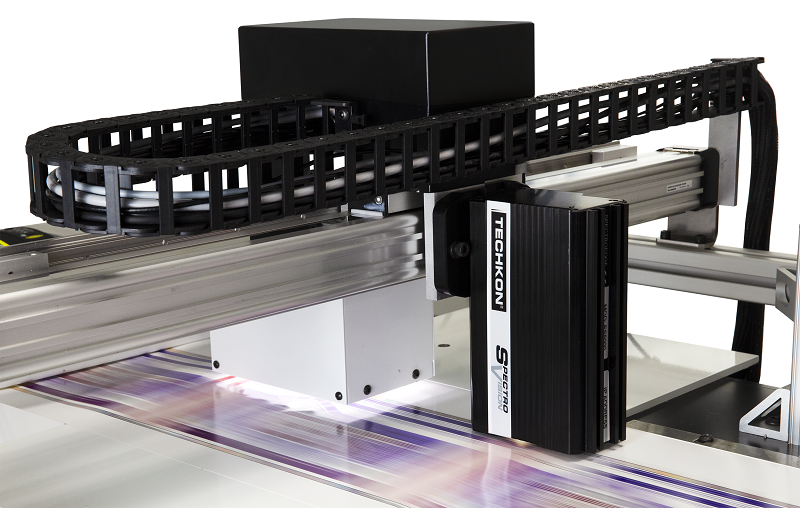
- Inline Spectrophotometers (SpectroVision, SpectroView, and SpectroEdge): For inline systems, a field calibration is completed automatically, as needed, by the device.
- Handheld (SpectroDens and Dens) and Scanning Spectrophotometers (SpectroJet and SpectroDrive): Handheld and scanning devices also undergo a field calibration in which the device can be calibrated by placing it on the charger, which has a small white tile built in.
- For handheld, scanning, and inline devices, factory recertification is free with the Planned Maintenance Program. Handheld and scanning devices will be sent to Techkon USA in Danvers, MA. Users will be sent a loaner device during this routine calibration. For inline devices, a technician will be sent on-site to replace the spectrophotometer with a loaner device while the original is sent to Danvers, MA to be recertified.
After calibration is complete, begin by selecting the sample you wish to measure. Place it under the spectrophotometer’s measurement aperture. Ensure the sample is clean and free from marks or debris for precise results.
Next, initiate the measurement process. The spectrophotometer will emit light onto the sample. It will then capture the reflected light to analyze the color properties.
Once the measurement is complete, you’ll receive a color reading. Compare this reading to another sample, reference color, or standard. This comparison will show how closely the sample matches the desired color.
Key steps for spectrophotometer usage include:
- Calibrating the device regularly
- Ensuring samples are clean
- Accurately positioning the sample
By following these steps, you can effectively use a spectrophotometer for color matching in print. Accurate color matching minimizes waste, enhances brand consistency, and improves overall printing quality.
Best Practices for Spectrophotometer Usage in Printing
To achieve optimal results, it’s vital to follow best practices when using a spectrophotometer. Begin by ensuring regular calibration of the device. Accurate calibration is a cornerstone for precise color measurement.
Maintain a clean working environment. Dust and debris can interfere with measurements. Always check samples for cleanliness before taking readings. This simple step can prevent inaccuracies during measurement.
When using the device, handle it with care. Follow the manufacturer’s guidelines closely. Proper use prolongs the life of the equipment and maintains measurement precision. Consistent handling practices foster reliable results.
Consider the following best practices:
- Calibrate regularly
- Maintain sample cleanliness
- Handle with care
- Follow manufacturer guidelines
By adhering to these practices, you reduce errors in color measurement. Accurate readings are crucial for maintaining print quality and brand integrity. Implementing these methods will enhance your printing workflow significantly.
Choosing the Right Spectrophotometer and Color Matching Tools
Selecting the correct spectrophotometer is essential for accurate color matching. The choice depends on your specific needs and environment. Consider whether a portable or benchtop model suits your workflow better.
Evaluate the features and software compatibility of potential models. Specialized software, such as Techkon’s ChromaQA6 with SmartInk, can aid in data analysis, color management, and ink toning.

It is also important to ensure that the spectrophotometer can integrate with your existing systems. Techkon’s handheld spectrophotometers integrate seamlessly into any printing process. Furthermore, Techkon’s inline solutions are compatible with a number of manufacturers, including Ryobi, Heidelberg, Komori, Mitsubishi, and Manroland.
Keep your budget in mind while evaluating different options. Higher prices do not always guarantee better performance. Look for models offering a balance of cost and quality, suitable for your specific requirements.
When deciding, consider these factors:
- Type of spectrophotometer (portable or benchtop)
- Software compatibility
- Budget considerations
By assessing these aspects, you can choose a tool that enhances your printing efficiency.
Common Challenges and How to Overcome Them
Using a spectrophotometer can present challenges, especially for beginners. Knowing common issues and solutions can improve your experience. Calibration errors and software problems often arise.
Address these challenges with regular maintenance and updates. Keep your device calibrated and software current for accurate results. Training can also help, ensuring users understand equipment functions and best practices. Techkon offers hands-on training, to ensure that press operators feel comfortable and confident integrating the device into their workflow.
To manage potential issues, consider these tips:
- Regularly calibrate your spectrophotometer
- Update software frequently
- Provide training for all users
These actions will help maintain accuracy and efficiency in color matching processes.
Conclusion: The Value of Spectrophotometer Color Matching in Print
Spectrophotometers offer remarkable precision in color matching for print. They ensure color consistency, reduce waste, and enhance brand integrity. By integrating them effectively, print professionals can achieve superior results and maintain competitive quality in their work.